
AI automation is easy to get excited about.
A new tool appears. Someone shows a clever demo. A competitor says they are “using AI.” Suddenly the question inside the business becomes:
Where can we add AI?
That is usually the wrong place to start.
The better question is:
Which work in this business happens repeatedly, follows a recognisable pattern, consumes time, and creates a real consequence when it is delayed or forgotten?
That is where useful automation tends to begin.
Not with novelty. With work.
A business does not need to automate everything. It needs to identify the workflows where automation can remove repeated effort, reduce dropped steps, improve consistency, or help the next action happen faster.
The most valuable AI automation opportunities are often hiding inside work the team already performs every day.
Start with the workflow, not the technology
Businesses often evaluate AI backwards.
They see that AI can write, summarise, answer questions, classify information, generate content or interact with customers.
Then they start looking for somewhere to use those abilities.
That can produce interesting experiments.
It does not necessarily produce better operations.
A stronger approach starts by mapping an existing workflow.
For example:
Customer asks a question → staff replies → customer asks about availability → staff checks calendar → customer chooses a time → staff confirms → payment details are sent → payment is checked → appointment is recorded → reminder is sent
There may be several automation opportunities inside that one journey.
But you only see them clearly when you stop thinking about “using AI” and start looking at the sequence of work.
The workflow reveals:
- what triggers the work
- which information is required
- what rules determine the next step
- where someone has to check another system
- which steps are repetitive
- where delays occur
- where customers drop out
- where exceptions need a person
That is much more useful than asking which AI feature sounds impressive.
The best automation targets usually have five characteristics
Not every repetitive task should be automated.
But strong candidates tend to share a few characteristics.
1. The work happens frequently
Frequency matters because small improvements compound.
A task that takes three minutes but happens 80 times a week may matter more than a task that takes an hour once every quarter.
Look for actions your team performs constantly:
- checking availability
- answering the same operational questions
- confirming appointments
- sending payment instructions
- following up unfinished conversations
- updating customer records
- sending reminders
- identifying customers who are due to return
- preparing recurring reports
- moving information between systems
The individual action may feel insignificant. The volume is what makes it operationally expensive.
2. The work follows rules
Automation becomes much easier when the business can explain how a decision should be made.
For example:
- if the customer asks for Service A, offer only staff members qualified for Service A
- if the appointment requires 60 minutes, do not offer a 30-minute gap
- if a deposit is required, the booking is not secured until payment status is confirmed
- if the customer has already booked, do not send another rebooking message
These are rules. Rules create structure.
When staff members perform a task by repeatedly applying the same logic, that is a strong sign the workflow may be suitable for automation.
By contrast, work that depends heavily on judgement, negotiation, empathy, clinical interpretation, legal analysis or unusual exceptions may need much more human involvement.
The goal is not to remove people from every decision. It is to stop using people for decisions the business has already standardised.
3. The next step depends on information the business already has
Many workflows are slow because the information needed to complete them sits somewhere else.
A staff member receives a message. Then they check the calendar. Then they check a price list. Then they ask who is working. Then they look at the customer record. Then they return to the conversation.
The work is not difficult. It is fragmented.
This is one of the strongest automation opportunities inside a business.
Ask:
Can the next action be determined using information we already maintain somewhere?
That information might include:
- opening hours
- services
- prices
- branch rules
- staff schedules
- customer history
- payment status
- appointment status
- previous conversations
- inventory
- eligibility criteria
- package balances
- standard policies
When the information already exists and the next step follows defined rules, automation can often connect the two.
That is different from asking AI to invent an answer. Useful business automation should operate from real business context.
4. Delay has a consequence
Some work can wait. Some cannot.
This distinction helps prioritise automation.
- If a report is prepared two hours later, perhaps nothing changes.
- If a customer asking for an available appointment waits two hours, they may book somewhere else.
- If an unpaid deposit is not followed up, the appointment may remain uncertain.
- If a cancellation is not noticed, an empty slot may go unused.
- If a returning customer is never contacted, the next visit may never happen.
- If a business owner does not see a recurring conversion problem for six months, the loss compounds.
The more time-sensitive the workflow, the more valuable reliable execution becomes.
A useful prioritisation question is:
What gets worse when this task is delayed?
The answer may be customer experience, conversion, revenue, utilisation, cash flow, retention, staff workload, reporting accuracy or response time.
Those consequences help separate genuinely valuable automation from convenience features.
5. The work is easy to forget
Some business processes fail not because they are difficult, but because nobody is explicitly responsible for remembering them at exactly the right moment.
Follow-up is a classic example.
A customer says:
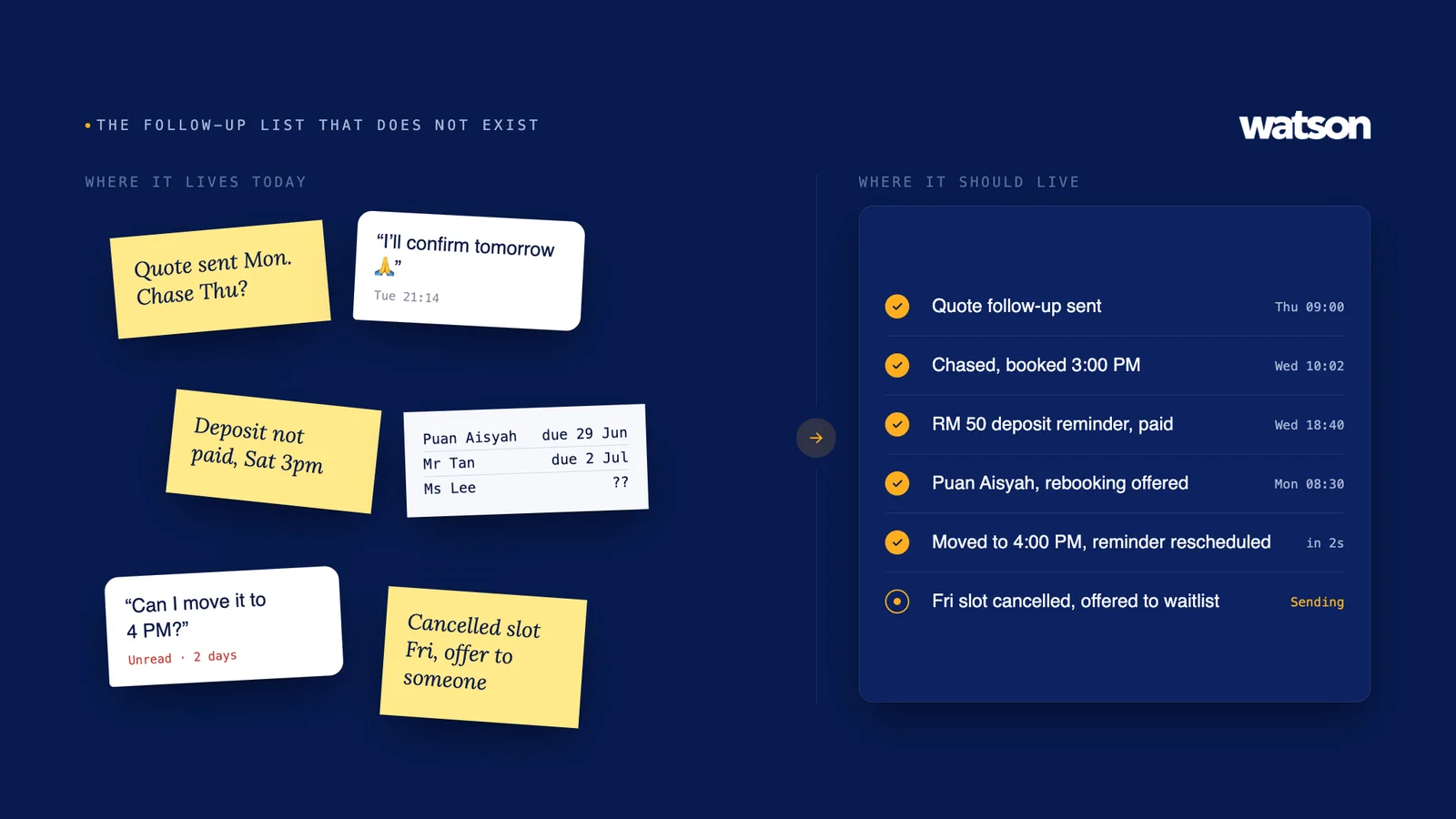
“I’ll confirm tomorrow.”
The conversation ends. Tomorrow arrives. Nobody follows up.
Not because the team does not care. Because another 40 things happened.
This pattern appears everywhere:
- quotations awaiting a decision
- customers who did not complete a booking
- deposits still unpaid
- people due for another appointment
- inactive customers who could be reactivated
- appointments requiring confirmation
- cancellations that could be offered to someone else
- leads requiring another touch
- recurring tasks that depend on someone remembering
If the process works only when someone remembers, it is fragile.
Automation is especially valuable when the trigger can be defined and the next action is known.
A simple framework for finding automation opportunities
Walk through the business and score recurring workflows against six questions.
Does it happen often?
High volume or repeated effort.
Does it follow clear rules?
Predictable decisions and actions.
Is the required information available?
Data the workflow can use.
Does delay create a cost?
Revenue, experience or operational consequence.
Is the task often forgotten?
Unreliable manual follow-through.
Can exceptions be handed to a person?
A clear boundary between automation and judgement.
The strongest opportunities tend to score well across several of these at once.
A task that is frequent, rules-based, time-sensitive and often forgotten should usually receive more attention than something that is merely fashionable to automate.
Look for chains of work, not isolated tasks
One of the biggest mistakes in workflow automation is automating a single step without looking at what happens immediately before and after it.
Suppose a business automates appointment reminders. That sounds useful.
But what happens if the customer replies:
“Can I move it to 4 PM?”
If the reminder system cannot connect that reply to live availability and the existing appointment, the team still has to take over and rebuild the process manually.
The reminder was automated. The workflow was not.
The same problem appears when businesses automate:
- lead capture but not follow-up
- booking requests but not confirmation
- payment links but not payment status
- customer messages but not the next operational action
- reporting but not what anyone should do about the report
The real value usually comes from connecting several steps.
Think in sequences:
Trigger → context → decision → action → next state
For example:
Customer asks for Saturday → service identified → availability checked → valid times offered → customer chooses → booking created → deposit requested → status updated → reminder scheduled
That is a workflow.
The more of that journey remains connected, the less manual reconstruction the team has to perform.
Three places to search inside your business
If you are unsure where to start, look in three places.
1. The inbox
Look at WhatsApp, calls, email, website enquiries and social messages.
Do not just count messages. Look for repeated patterns.
- What are customers repeatedly asking?
- What information does staff repeatedly retrieve?
- Which questions turn into another action?
- Which conversations require someone to check another system?
- Where do customers commonly stop responding?
Communication is often the visible starting point of a deeper workflow.
2. The calendar and transaction flow
Look at what happens around appointments, orders, payments, deliveries or service completion.
- Where are staff checking availability?
- Where are bookings confirmed?
- Where are deposits tracked?
- Where are reminders sent?
- What happens when something changes?
- What happens when a customer cancels?
- What happens after the transaction?
A surprising amount of repetitive work hides between the customer’s decision and the business actually completing the transaction.
3. The follow-up list that does not exist
Ask your team:
What are we supposed to remember to come back to later?
This question often exposes valuable automation opportunities immediately.
You may discover:
- leads waiting for a decision
- customers due for another visit
- quotes requiring follow-up
- incomplete bookings
- unpaid balances
- customers who have become inactive
- internal exceptions needing review
- recurring operational checks
These are often not stored in one clean list. They live inside people’s heads, chat threads, calendars, sticky notes and spreadsheets.
That is exactly why they get missed.
What not to automate first
AI automation is not automatically useful just because a task can technically be automated.
Several categories deserve caution.
Low-frequency work
If something happens twice a year, automating it may cost more effort than simply doing it.
Undefined processes
If three employees perform the same task three completely different ways, automation will not fix the ambiguity. The business may need to define the process first.
High-judgement decisions
Tasks involving complex professional judgement, sensitive conversations or unusual cases should usually retain a clear human decision point.
Broken processes
Automating a poor process can simply make the poor process run faster. If the underlying rule, policy or customer journey is wrong, fix that before scaling it.
Tasks with no meaningful consequence
Some automations are impressive but commercially irrelevant. If removing the task does not improve customer experience, staff capacity, revenue, accuracy, speed or decision-making, it may not deserve priority.
Do not measure automation by how many tasks it replaces
A common way to talk about automation is:
How many hours did this save?
Time saved matters. But it is not the only outcome.
Sometimes the bigger value is that something happens reliably.
- A customer receives a follow-up every time.
- A booking reflects actual availability.
- A deposit remains connected to the appointment.
- A cancellation reaches the right waiting customer quickly.
- The owner sees a recurring problem before another month passes.
- The customer does not have to explain the same context again.
These improvements may be more valuable than a raw count of minutes saved.
A stronger automation scorecard might include:
- completion rate
- response time
- conversion rate
- number of dropped steps
- number of manual handoffs
- repeat customer rate
- unfilled capacity
- payment completion
- exception volume
- staff intervention required
The goal is not automation for its own sake. The goal is a better-running business.
Where AI adds value beyond traditional automation
Traditional automation is excellent when the input is already structured. If X happens, do Y.
AI becomes more useful when the workflow begins with less structured information.
For example, a customer may write:
“Can come after work tomorrow? Prefer the same person as last time.”
That message contains several pieces of intent:
- the customer wants an appointment
- the preferred date is tomorrow
- the preferred time is after working hours
- they want the same staff member as a previous visit
A useful AI workflow can interpret that request, connect it to business context, apply the appropriate rules and move toward a valid next step.
This is where artificial intelligence automation can extend normal workflow automation.
Not by replacing rules. By helping the system understand messy human input before applying those rules.
The strongest systems usually need both:
Flexible understanding + controlled execution
The business should still know when a person needs to step in
Good automation has boundaries.
A business should be able to define situations where the automated workflow stops and a person takes over.
For example:
- the request falls outside approved information
- the customer asks for professional advice
- an exception to normal pricing is requested
- the situation is sensitive
- no valid option exists
- the customer is unhappy
- the system lacks enough context
- a decision requires manager approval
This is not a failure of automation. It is good workflow design.
The purpose is not to eliminate humans. It is to make sure human attention is used where it is actually valuable.
Build an automation map before buying more tools
Before adding another AI product, map ten workflows your team performs repeatedly.
For each one, write down:
Trigger
What starts the work?
Information
What does the person need to know?
Rules
How is the next step decided?
Action
What needs to happen?
System
Where is the information recorded?
Delay cost
What happens if nobody acts?
Exception
When should a person take over?
You will quickly see that some workflows are much stronger automation candidates than others.
You may also discover that several apparently separate tasks are actually one connected journey.
That is where the most useful opportunities often sit.
A practical example
Imagine a service business receives this WhatsApp message:
“Hi, I came last month. Can I book the same service with Mei this Saturday afternoon?”
A weak automation approach sees one problem:
Reply to the WhatsApp message automatically.
A workflow approach sees the full operation:
- identify the customer
- understand the requested service
- retrieve previous context
- recognise the staff preference
- check whether Mei provides that service
- check Saturday availability
- filter for afternoon times
- offer valid options
- create the selected booking
- apply any deposit rule
- confirm the appointment
- schedule the appropriate reminder
- keep the conversation attached to the booking
- escalate if the request cannot be fulfilled normally
That difference matters.
Automating the reply saves typing. Automating the workflow moves the business forward.
The best place to begin is usually already obvious
You probably do not need a workshop to find your first automation opportunity.
Ask your team three questions:
- What do you do over and over every day?
- What do you regularly forget to come back to?
- What requires checking three places before you can take the next step?
The answers will reveal more than a list of AI features.
AI automation creates the most value when it is applied to real operational friction: repeated actions, predictable decisions, disconnected information and next steps that are too easy to miss.
Start there.
Once the workflow is clear, the technology becomes the easier part.
Ask Watson anything a customer would ask you
Watson answers the calls, books the appointments and follows up afterwards. Put it through whatever your front desk gets asked.