
A customer chooses a service, picks a time and clicks Book.
From their side, it feels finished.
But for a lot of businesses, that single booking creates a string of manual work behind the scenes.
- Someone still has to confirm the appointment.
- Someone checks whether payment came through.
- Someone sends the reminder.
- Someone handles the reschedule.
- Someone notices the cancellation.
- Someone follows up when the customer does not show.
So the business has a booking system.
The question is whether the system is actually handling the booking journey, or only the moment when a customer chooses a time.
That distinction matters.
Putting a slot on a calendar is useful. But it is not the same as running the workflow around it.
What should a booking system actually handle?
A useful booking system should reduce the amount of work created by every appointment.
The journey is usually bigger than:
Choose time → Booked
It is closer to:
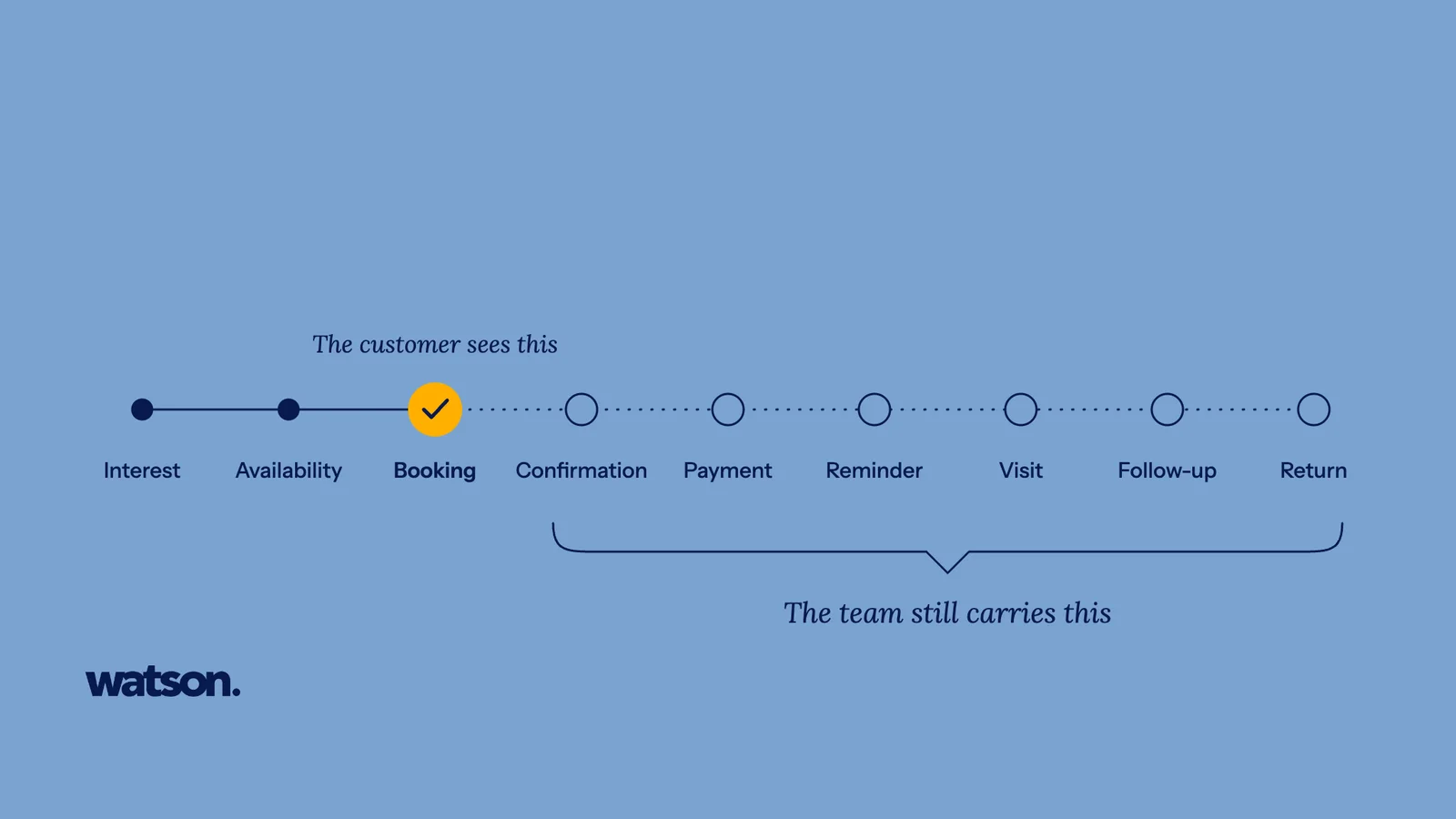
Interest → Availability → Booking → Confirmation → Payment → Reminder → Visit → Follow-up → Return
Every handoff in that chain can create more admin.
If the software handles only the booking itself, your team still has to carry the rest.
That is why businesses can have an online booking system and still feel like they are constantly chasing appointments.
The customer sees one action. The team sees everything that still needs to happen.
The first problem: showing a time is not the same as showing the right time
A customer wants Tuesday at 3 PM.
Can they have it?
That depends on more than whether the calendar looks empty.
The business may need to account for:
- service duration
- staff eligibility
- branch
- working hours
- buffers
- existing appointments
- staff leave
- customer preference
- deposit requirements
If the booking page does not already understand those rules, someone has to check them manually.
That means the customer has technically booked online, but the team still needs to validate whether the booking works.
A better booking workflow only presents times the business can genuinely take.
That removes one of the most common pieces of admin before the appointment is even confirmed.
For Watson, this is the role of Appointment Scheduling: the scheduling layer checks service, staff, branch, duration, buffers and live availability before a time is offered.
Online booking still creates work when confirmation is separate
The customer has selected a slot.
What happens next?
If someone on the team still has to open WhatsApp and write:
“Hi, just confirming your appointment for Saturday at 2 PM.”
then the booking system has stopped too early.
The same problem appears when the booking needs a deposit.
A customer can choose a time online, but the team may still need to:
- send the payment request
- check whether it was opened
- verify whether payment was completed
- match the payment to the correct booking
- update the appointment status
- follow up if payment is still outstanding
That is not one booking task. It is a payment workflow attached to a booking.
If the two are disconnected, the admin simply moves from the calendar into another tool.
Watson’s Booking Deposits feature is designed around keeping the payment request and payment state connected to the appointment instead of treating payment as a separate manual chase.
Appointment reminders should follow the booking automatically
Once the appointment is confirmed, the business still needs the customer to show up.
This sounds obvious. Yet reminders often become another manual process.
- Someone checks tomorrow’s appointments.
- Someone sends the messages.
- Someone notices a reply.
- Someone updates the booking again.
The important part is not just sending a reminder. It is keeping the reminder connected to the current appointment.
- If the customer reschedules, the reminder should follow the new time.
- If the booking is cancelled, the old reminder should not still go out.
- If the customer replies to confirm, the team should not have to update three different places.
A good appointment booking system should treat the reminder as part of the same workflow.
Watson’s Appointment Reminders are built around the appointment record so confirmations and supported change requests stay connected to the booking.
Rescheduling is where weak booking workflows become obvious
The original booking is usually the easy part.
Changes expose the real process.
A customer messages:
“Can I move it to Saturday afternoon?”
Now somebody may need to:
Identify
Find the appointment.
Check times
Check valid Saturday times.
Check staff
Check the right staff member.
Move
Move the appointment.
Release
Release the old slot.
Calendar
Update the calendar.
Reminder
Update the reminder.
Confirm
Confirm the change with the customer.
If that entire sequence depends on a person manually joining the dots, the business does not have a connected booking workflow.
It has a booking page at the front and manual operations behind it.
That is why a good website booking system should be judged by more than how easy it is to create the first appointment.
You also need to ask:
What happens when the appointment changes?
Cancellations should trigger the next action
A cancellation is not just an appointment disappearing from the calendar.
It creates a new opportunity.
- A slot becomes available.
- There may already be someone who wanted an earlier appointment.
- There may be a customer on a waitlist.
- There may be a warm lead who could take the opening.
But if the cancellation simply creates an empty gap, the business has to notice it and do something manually.
A connected workflow should be able to:
- release the slot
- update availability
- identify an appropriate customer
- offer the opening
- confirm the replacement
- update the schedule
The value is not just convenience. It is recovering capacity that would otherwise go unused.
Watson’s Appointment Scheduling and waitlist workflow are designed around keeping that capacity connected to the rest of the booking journey.
No-shows should not be the end of the customer journey
A customer does not show up.
The immediate loss is obvious: the slot was wasted.
The less obvious question is what happens after.
- Does anyone follow up?
- Can the customer rebook?
- Does the team know whether this was the first no-show or part of a pattern?
- Does the customer simply disappear from the business?
A booking system that only records No Show has documented the problem.
It has not helped the business recover from it.
The same is true for:
- incomplete bookings
- unpaid deposits
- cancellations
- customers who said they would book later
- customers who were expected to return
Each of those situations should have a defined next step.
Otherwise the team has to remember.
And anything that depends on memory will eventually get missed.
The real booking problem is usually the handoffs
Many businesses already have the tools they need.
- A booking page.
- A calendar.
- WhatsApp.
- A payment method.
- A customer list.
The problem is that the information sits in separate places.
The team becomes the connection between them.
- One person remembers that a customer paid.
- Another knows the appointment moved.
- Someone else notices the reminder was never sent.
- Another person remembers that a regular customer has not returned.
The business may have software for every individual task.
But people are still carrying the workflow.
That is why adding another standalone tool does not always reduce admin.
Sometimes it simply creates another place to check.
How to tell whether your online booking system is actually reducing work
Ask your team one question:
What do we still have to chase after someone books?
Write down the answers.
They might include:
- confirmations
- deposits
- payment status
- customer details
- reminders
- reschedules
- cancellations
- no-shows
- empty slots
- customers who never completed the booking
- customers who were supposed to return
Then ask:
Why does someone still have to chase it?
Usually the reason falls into one of three buckets:
The system does not know the current status
The information sits somewhere else.
The system knows the status but cannot act on it
Someone has to manually take the next step.
Different parts of the journey live in different systems
The team has to join the context together.
Those are the places where booking automation can create the most value.
What to look for in a booking system
If you are reviewing your current setup or comparing booking systems, do not stop at the booking page.
Look at how much of the full appointment journey the system can actually carry.
A strong booking workflow should help with:
Live availability
Customers should only see valid times based on the real rules of the business.
Booking confirmation
Once the required conditions are met, the customer should know the appointment is secured without waiting for someone to respond manually.
Deposits and payments
If payment is required, the payment state should stay attached to the booking.
Appointment reminders
The reminder should reflect the current appointment and respond correctly when that appointment changes.
Rescheduling and cancellation
Changes should update the relevant booking, calendar and follow-up steps without rebuilding the whole appointment by hand.
Waitlist and cancelled-slot recovery
A newly opened time should be easier to refill while it is still valuable.
Customer follow-up
If the booking is not completed, the customer does not show, or the next visit is due, the business should have a clear next action.
That is the difference between a booking tool and a booking workflow.
Your customers should not see the admin behind the booking
The customer should not need to know how many systems the business uses.
They should be able to:
- Choose.
- Book.
- Pay if required.
- Receive confirmation.
- Get reminded.
- Change the appointment when allowed.
- Show up.
- Come back.
The complexity belongs behind the scenes.
A good booking system should absorb more of that complexity instead of passing it back to the customer or the team.
Online booking was supposed to remove work
That is the benchmark worth using.
The goal was never to put a nice booking form on a website while the team kept doing everything else manually.
The goal was to make the whole journey easier to run.
So if your customers can already book online but your team is still:
- checking,
- confirming,
- chasing,
- copying,
- reminding,
- rescheduling,
- and following up,
you do have a booking system.
But you may only be automating one moment in the journey.
The better question is:
How much of the booking workflow still depends on your team?
That is where the real opportunity is.
Ask Watson anything a customer would ask you
Watson answers the calls, books the appointments and follows up afterwards. Put it through whatever your front desk gets asked.