
Automation makes customer communication faster.
It also makes mistakes faster.
A staff member sending the wrong message to one customer is a problem. An automated workflow sending the wrong message to 5,000 customers is a system problem.
That is why PDPA Malaysia should be part of the design conversation before a business automates WhatsApp messages, reminders, follow-ups, promotions, reactivation campaigns or customer profiling.
The goal is not to make customer communication slower. It is to make sure the rules behind the communication are clear before software starts applying them at scale.
Important: this article provides general practical information, not legal advice. Businesses should obtain professional advice for their specific circumstances and industry requirements.
What does PDPA Malaysia cover?
Malaysia’s Personal Data Protection Act 2010 (Act 709), as amended by the Personal Data Protection (Amendment) Act 2024, regulates the processing of personal data in connection with commercial transactions.
The Act is built around seven personal data protection principles:
- General
- Notice and Choice
- Disclosure
- Security
- Retention
- Data Integrity
- Access
For a business automating customer communication, these principles are not abstract compliance language. They translate into very practical questions:
- Why do we have this customer’s data?
- What did we tell them when we collected it?
- What are we using it for now?
- Who can access it?
- How long are we keeping it?
- Can the customer correct it or object to certain uses?
- What happens when they ask us to stop contacting them?
The 2024 amendments came into force in stages during 2025, so businesses should make sure their current processes reflect the amended framework rather than relying on an old PDPA checklist.
Start with the purpose, not the automation
The easiest place to make a mistake is at the beginning.
A business collects a phone number because a customer:
- requested a quotation
- made an appointment
- bought something
- submitted an enquiry
- joined a loyalty programme
- asked for a callback
Months later, the same number is still sitting in the database.
That does not automatically mean every future use of that number fits the original reason it was collected.
Before building an automated workflow, write down the purpose of the communication in plain language. For example:
Operational communication
- confirming a booking
- sending a reminder
- providing a receipt
- responding to an enquiry
- notifying a customer about a change they requested
Promotional communication
- advertising a new offer
- sending a campaign
- promoting a package
- reactivating inactive customers with a marketing message
- adding someone to a recurring promotional broadcast
The important point is not the label itself. It is whether the business can explain why the data is being used and whether that use is consistent with the notices, choices and permissions that apply.
Automation should come after that decision, not before it.
Review what customers were actually told
One of the core PDPA principles is Notice and Choice.
Customers should be informed about how their personal data is being processed and the purposes involved.
This creates a common operational problem. A business may have a privacy notice on its website, but the actual customer journey happens through:
- a phone call
- a booking form
- a QR code
- a lead form
- a walk-in registration
- a third-party marketplace
If personal data enters through six routes, the business needs to understand what notice or information the customer receives through those routes.
Before automating customer communication, check:
Where is the data collected?
Map the real collection points, not just the website.
What does the customer see at that point?
Do not assume a privacy notice somewhere else solves every collection flow.
What purposes are described?
Compare those purposes with what the automation will actually do.
Who else receives the data?
If vendors or service providers process customer information, understand those relationships too.
This is particularly important when several systems are connected together. A booking form may feed a CRM, which feeds a messaging platform, which feeds an analytics tool.
For businesses thinking about PDPA compliance, the collection point matters just as much as the downstream automation. A customer who submits details for a booking may not expect those details to be reused later for unrelated WhatsApp marketing. That is why the notice, stated purpose and customer choice need to match what the business actually plans to do with the data.
The customer sees one business. Behind the scenes, the data may move through several systems.
Do not treat service messages and marketing messages as the same thing
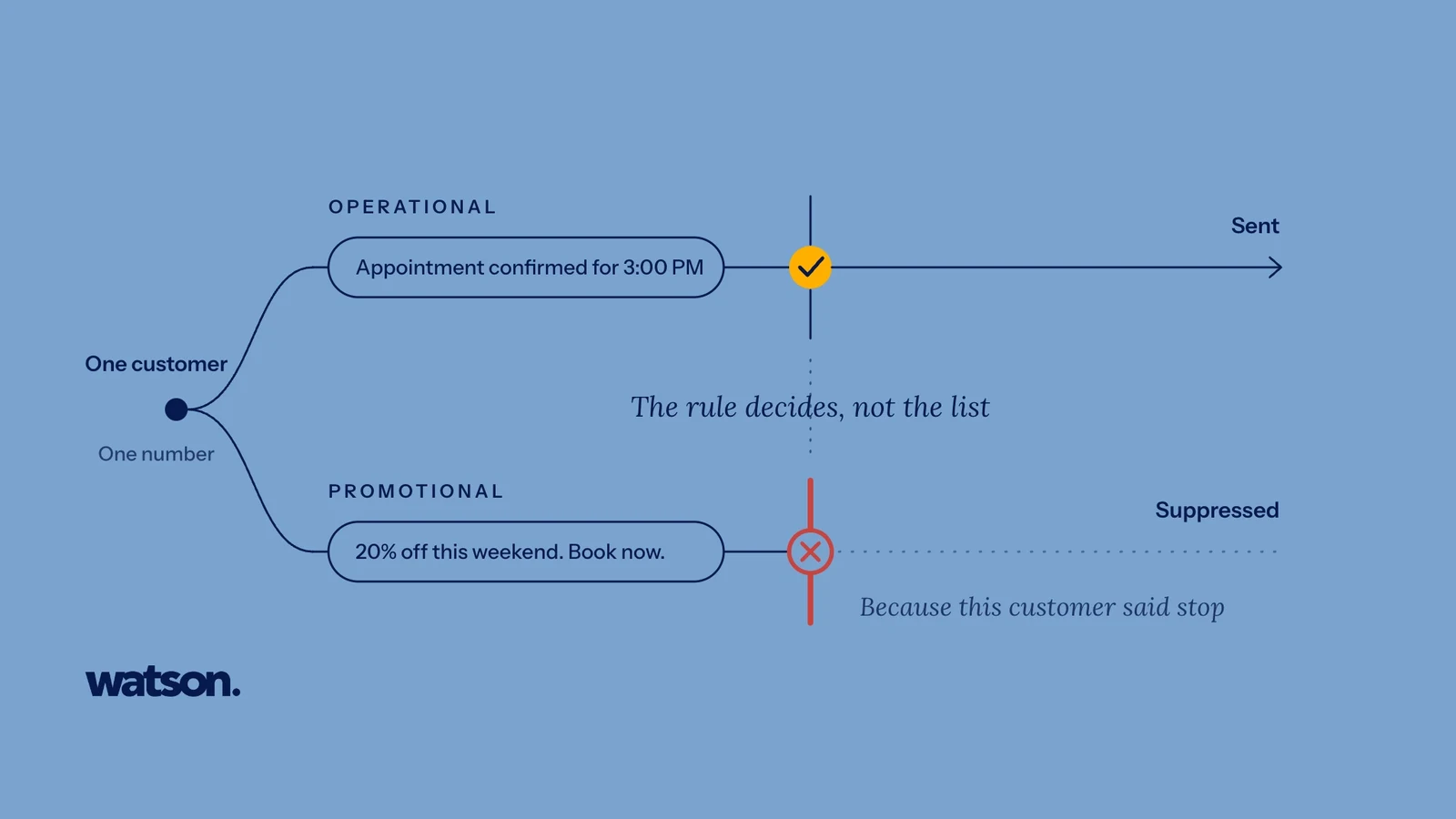
Consider these two WhatsApp messages:
“Your appointment is confirmed for 3:00 PM tomorrow.”
and:
“We have 20% off this weekend. Book now.”
They may go to the same phone number, through the same WhatsApp account, from the same business. But they serve different purposes.
That distinction matters when designing automated customer journeys.
A common mistake is building one broad customer list and using it for every type of communication. A better system separates communication based on why the customer is being contacted.
This is especially important for marketing consent. A business should be able to distinguish customers receiving operational messages from customers who are eligible for promotional communication, rather than assuming that every person in the database belongs in every campaign.
For example, a business might maintain different rules for:
- booking confirmations
- reminders
- payment notifications
- service follow-ups
- review requests
- promotional broadcasts
- win-back campaigns
This makes PDPA compliance easier to manage because the business can apply different controls to different types of communication instead of treating every stored phone number as equally usable for every message.
Make “stop” an actual system state
A customer asking not to receive marketing should not become a note someone has to remember.
Malaysia’s PDPA gives data subjects rights in relation to direct marketing, including the ability to prevent processing for direct marketing purposes.
In operational terms, that means your system needs somewhere to record the decision. A strong workflow should be able to answer:
- Has this customer opted out of promotional communication?
- When was that preference recorded?
- Does the preference apply across all relevant campaign lists?
- Can another staff member accidentally re-add the customer?
- Does importing a new spreadsheet overwrite the preference?
- Does a new campaign automatically exclude suppressed contacts?
This is where automation can actually improve privacy.
If the rule is designed properly, the system can apply the customer’s preference consistently every time.
If the rule is designed badly, automation can repeatedly ignore the same preference at scale.
Collecting more data is not automatically better
Customer data becomes tempting once a business starts connecting systems. If the business can store a field, someone eventually wants to fill it.
But more data creates more responsibility. Before adding information to an automated customer profile, ask:
Do we need this information for the workflow?
A booking process may need a customer’s name, contact details and appointment information. It does not necessarily need unrelated personal information simply because the software can store it.
This matters even more when sensitive information is involved.
For example, healthcare-related information can fall within sensitive personal data. Businesses operating in regulated or sensitive environments should be especially careful about separating operational customer information from information that belongs in a specialist clinical or regulated system.
Data minimisation is good operational design even when you are not using that phrase internally. Less unnecessary data means:
- fewer fields to secure
- fewer permissions to manage
- less information exposed if something goes wrong
- simpler retention decisions
- clearer customer records
Know which systems are handling customer data
Automation rarely lives in one piece of software. A typical customer workflow might involve:
Customer → Website form → CRM → WhatsApp platform → Booking system → Payment provider → Analytics
That means data privacy Malaysia requirements cannot be managed only at the point where the customer first submits information. In practice, a responsible data privacy Malaysia review needs to follow the data through the entire workflow, including the third-party tools used to store, send, analyse or enrich customer information.
Map the systems that touch the data. For each one, understand:
- what data it receives
- why it receives it
- who can access it
- where it is processed or stored
- how long it is retained
- whether it is passed to another provider
- what happens when the relationship with the provider ends
If personal data is transferred outside Malaysia, the PDPA’s cross-border transfer requirements and the Commissioner’s current cross-border transfer guidance should be considered.
The practical lesson is simple:
Do not automate a customer journey you cannot map.
Decide who actually needs access
Automation often centralises information. That is useful, but centralisation can also mean more people suddenly have access to more customer data.
Before launching the workflow, define permissions intentionally.
- A receptionist may need to see appointment information.
- A marketing team member may need campaign eligibility.
- A manager may need performance information.
- A finance role may need payment status.
That does not mean everybody needs access to everything.
The PDPA Security Principle requires practical steps to protect personal data against loss, misuse, modification, unauthorised or accidental access or disclosure, alteration or destruction.
So access should follow the job being done. A useful review is:
Person → Role → Data needed → Action allowed
If you cannot explain why a role needs a category of customer data, reconsider the permission.
Retention needs a rule too
Automation is very good at collecting information. It is less good at deciding when information should disappear unless somebody tells it.
Malaysia’s PDPA includes a Retention Principle: personal data should not be kept longer than necessary for the purpose for which it is processed.
So “we keep everything forever” is not a retention strategy. Businesses should define what happens to:
- old enquiry records
- inactive leads
- previous campaign lists
- customer conversation history
- exported spreadsheets
- duplicate customer profiles
- former customer records
- data stored in disconnected systems
The exact retention period may differ depending on the information, purpose, legal requirements and industry.
What matters operationally is that retention is a deliberate rule rather than an accidental result of never deleting anything.
Plan for a breach before there is one
The amended PDPA introduced data breach notification requirements, and the Commissioner has published specific guidance for handling personal data breaches.
Under the current Data Breach Notification guidance, a qualifying breach must be reported to the Commissioner as soon as practicable and no later than 72 hours from the occurrence of the personal data breach.
For businesses using automated customer systems, preparation matters. Before launch, know:
- who investigates a suspected breach
- who decides whether notification criteria are met
- how incidents from third-party providers are escalated
- where relevant logs are stored
- who can disable an affected integration
- how affected data subjects will be contacted when required
A breach response plan written after the breach is already late.
Check whether your business needs a Data Protection Officer
Since 1 June 2025, Malaysia has had specific requirements around the appointment of Data Protection Officers.
According to the Personal Data Protection Commissioner’s current FAQ, a data controller or data processor must appoint one or more DPOs when processing involves:
- personal data exceeding 20,000 data subjects;
- sensitive personal data, including financial information, exceeding 10,000 data subjects; or
- activities requiring regular and systematic monitoring, such as tracking online user behaviour.
Not every small business automatically needs a DPO.
But any business increasing the scale of automated processing should know whether it is approaching a threshold or carrying out processing that creates the obligation.
Do not wait until the system has accumulated tens of thousands of customer records to ask the question.
A practical PDPA review before you switch automation on
Before an automated customer workflow goes live, sit down with the people responsible for operations, marketing, technology and privacy and walk through the journey from beginning to end.
You should be able to answer all of these clearly:
Collection
Where did the customer data come from?
Purpose
Why was it collected, and why are we using it now?
Notice
What was the customer told about that use?
Communication type
Is this operational communication, direct marketing or something else?
Customer choice
How can the customer withdraw consent or stop relevant marketing communication?
Suppression
Will the system remember that preference everywhere it needs to?
Data
Are we processing only the information the workflow actually needs?
Access
Who can see the information, and why?
Vendors
Which third parties or processors receive the data?
Location
Is any personal data transferred outside Malaysia?
Retention
When is the information deleted or anonymised?
Security
What controls protect the data?
Incident response
What happens if the data is exposed, lost or accessed improperly?
Governance
Does the business need a DPO, specialist review or additional industry-specific controls?
If several answers are unclear, that is a signal to fix the process before scaling it.
Good automation should make responsible data use easier
The wrong conclusion from PDPA is that businesses should avoid automation.
The better conclusion is that automation needs better rules.
A well-designed system can make responsible customer communication more consistent by enforcing:
- clear communication categories
- permission and preference records
- suppression rules
- controlled access
- defined retention
- auditable workflows
- consistent handling of customer requests
That is better than relying on individual staff members to remember every rule manually.
The risk appears when businesses automate first and decide the rules later.
Before asking, “Can we automate this message?” ask:
- Why are we sending it?
- What data are we using?
- What does the customer expect?
- What happens if they say stop?
Once those answers are clear, the automation becomes much easier to design responsibly.
Ask Watson anything a customer would ask you
Watson answers the calls, books the appointments and follows up afterwards. Put it through whatever your front desk gets asked.